Us Apes are running Minecraft with a custom Modrinth modpack built to make the world feel huge, beautiful, and worth exploring for a long time. This world is going to feel extra special because we are using Tectonic and Terralith together, which means better terrain, better biome variety, more dramatic landscapes, and way more moments where you stop and just stare at the view.
On top of that, the pack includes our preloaded Voxy cache, so players can see very, very, very far! Big mountains, giant skylines, sweeping valleys, and huge horizon views hit way harder when the world is already ready to render out in the distance. This server is built for exploring, building, and making the map feel massive from the first minute you log in.
Why this pack is awesome
- Tectonic + Terralith world generation
- Preloaded Voxy for huge view distance
- Modrinth install for easy setup
- Protected base claiming with Get Off my Lawn mod
Quick start
- Install Modrinth
- Download our modpack
- Import the pack into Modrinth
- Optionally copy your settings and configs
- Launch and join the server
Server info
The server is set up for homoapes.com, and that should already be included in the modpack profile so it is easy to get in and start playing.
Install with Modrinth
To join the server, install Modrinth, then download and import our modpack. I will have a video on this page showing the full setup process, including how to install Modrinth, install our pack, and move over your existing Minecraft settings and mod configs.
Step 1: Install Modrinth
Download Modrinth App
Step 2: Download our modpack
Direct Download (Central US)
Cloud Download (Google Drive)
Step 3: Import the modpack into Modrinth
Open Modrinth, import a profile, and select the modpack file.
Land Claiming: Get Off My Lawn Mod
We are also using Get Off My Lawn on the server. This mod lets players protect their builds and land by creating claims, which helps keep bases safe and cuts down on griefing. In simple terms: if you build somewhere important, you can reserve that area and make it yours.
There are two main parts players should know about: Claim Anchors, which are the base claim blocks, and Augments, which add extra effects or special behavior to your claim.
Claim Anchor Types
You can either craft the anchor block directly, or upgrade an existing anchor by using the upgrade item from the level below.
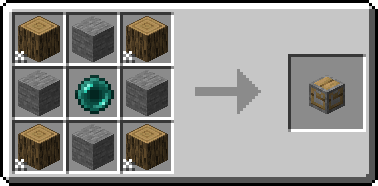
Makeshift Claim Anchor
Starter anchor for your first protected area.
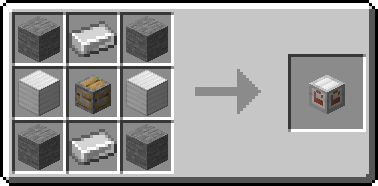
Reinforced Claim Anchor
The next step up from Makeshift.
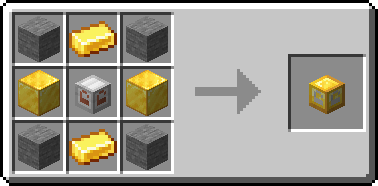
Glistening Claim Anchor
Mid-tier anchor with stronger claim progression.
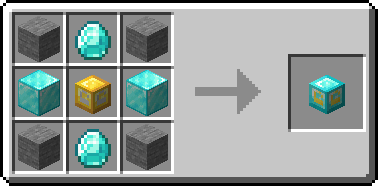
Crystal Claim Anchor
Another step up for bigger and better claims.
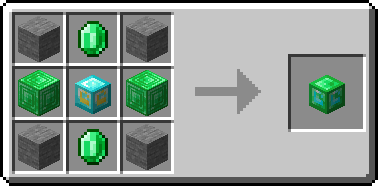
Emeradic Claim Anchor
High-tier anchor for serious builders.
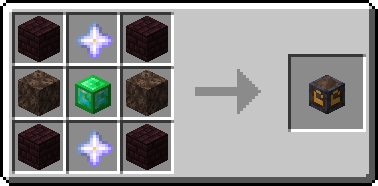
Withered Claim Anchor
Top-end claim anchor in the progression line.
Upgrade Path
If you already placed an anchor, you do not need to break it and remake everything from scratch. You can upgrade the anchor by right clicking the placed anchor with the upgrade kit for the next tier.
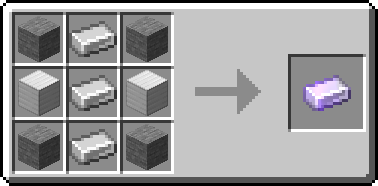
Makeshift → Reinforced
Craft the Reinforced Upgrade Kit, then right click your Makeshift Claim Anchor to upgrade it into a Reinforced Claim Anchor.
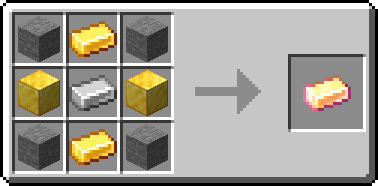
Reinforced → Glistening
Craft the Glistening Upgrade Kit, then right click your Reinforced Claim Anchor to turn it into a Glistening Claim Anchor.
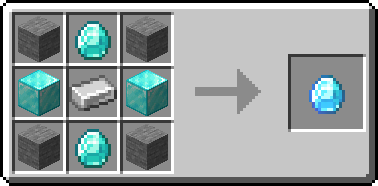
Glistening → Crystal
Craft the Crystal Upgrade Kit, then right click your Glistening Claim Anchor to upgrade it into a Crystal Claim Anchor.
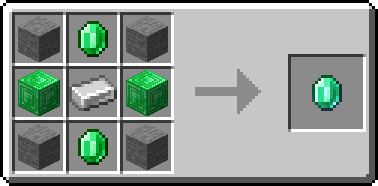
Crystal → Emeradic
Craft the Emeradic Upgrade Kit, then right click your Crystal Claim Anchor to upgrade it into an Emeradic Claim Anchor.
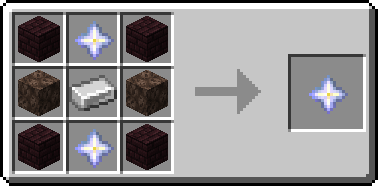
Emeradic → Withered
Craft the Withered Upgrade Kit, then right click your Emeradic Claim Anchor to upgrade it into a Withered Claim Anchor.
Claim Augments
Augments let you add extra functionality or special effects to your claim. Here are the recipes in a more compact layout so you can check what you need without scrolling forever.
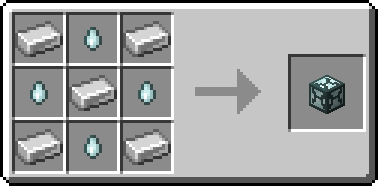
Angelic Aura
Grants regeneration to players inside your claim.
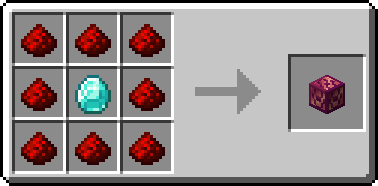
Chaos Zone
Gives all players in the area a Strength boost.
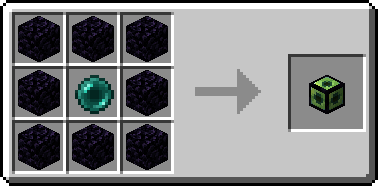
Ender Binding
Prevents Endermen from teleporting inside your claim.
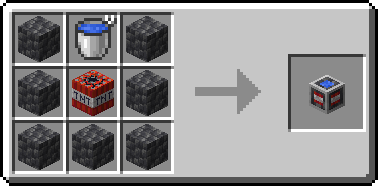
Explosion Controller
Lets you control whether explosions are allowed.
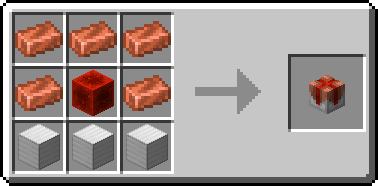
Force Field
Pushes non-whitelisted players out of your claim.
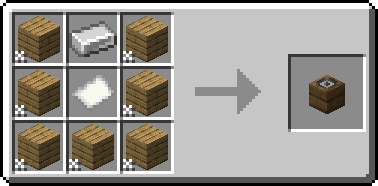
Greeter
Displays a message when players enter your claim.
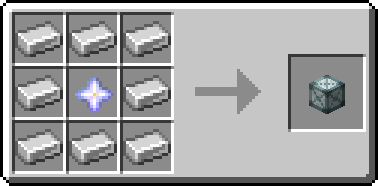
Heaven Wings
Allows flight while inside the claim.
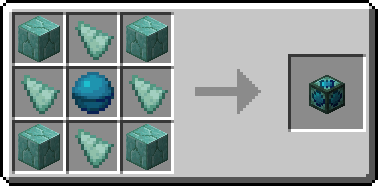
Lake Spirit's Grace
Grants water breathing and improved underwater vision.
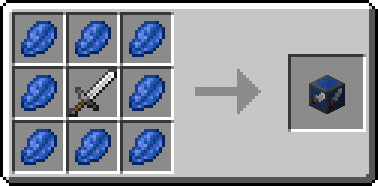
PvP Arena
Lets you enable or control PvP inside the claim.
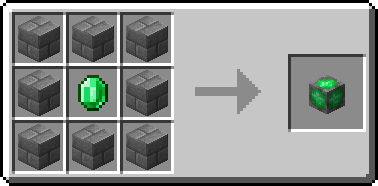
Village Core
Prevents zombies from harming villagers in your area.
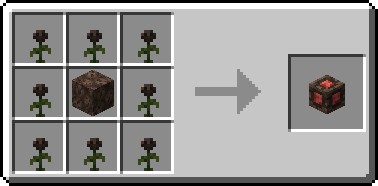
Withering Seal
Blocks the Wither status effect inside your claim.
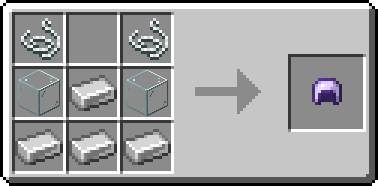
Goggles
Lets you see claim boundaries and protected areas.